

I saw one of beesandbombs' christmas pieces and thought, "I bet I can do that using only CSS3 Animations".
Topped it with an animated GIF because of reasons. Man! Is there anything more late-nineties than a rotating green wireframe skull-and-crossbones?
Don't answer that.
Springs! Tap the canvas to move the anchor point; double-tap to randomize the number of points.
Spooky Star
UPDATE: I was informed that the star was insufficiently spooky. Corrections have been made.
After staring at Tumblr genius beesandbombs' piece warps for way too long, I had to copy it.
SVG continues its march towards ascendancy as a web graphic format. There are tools for generating svg at runtime -- d3.js, svg.js, and raphael.js, to name a few -- but what if you just want a procedurally generated graphic for use as a background image? It makes more sense to do it once than to have each client regenerate it on every pageload.
I found a few people doing this online, with approaches falling into two categories:
I'm really enjoying client-side Web technology lately, so I decided to take the third path: Load an SVG-generating page into a headless browser, grab the SVG node out of the DOM, and save it to a file. For the browser I used the excellent PhantomJS. My script was this:
#!/Users/sixsided/bin/phantomjs

var page = require('webpage').create();
var args = require('system').args;
var system = require('system');


var svg_url = args[1];
var svg_jquery_selector = args[2] || 'svg';  // default to reading first <svg> in page

system.stderr.write([svg_url, svg_jquery_selector].join(', '));

page.onConsoleMessage = function (msg) {
    // print any js errors to stderr
    system.stderr.write("\n\n\n\n");
};

page.open('http://livecode/mksvg.html', function () {
    system.stderr.writeLine('this: ' +  this +  '  window: ' +  window);

    system.stdout.write(page.evaluate(function(selector){
        // SVG is a different XML dialect from HTML, so it has no innerHTML;
        // wrap it in a div in order to get at its content
        var d = document.createElement('div');
        d.appendChild(jQuery(selector)[0].cloneNode(true /* deep copy */));
        return d.innerHTML;
    }, svg_jquery_selector));
    phantom.exit();

});
Usage:
scrape_svg.js http://d3js.org/ svg
PhantomJS isn't especially complicated, but it is different from straight-up browser scripting. The browser js environment is sandboxed away from then nodejs environment via callbacks that can only accept (and return) simple Javascript objects (ie, only what you could pass through JSON). There's a DOMWindow object available in the top-level nodejs scope, on which you can call setTimeout, etc.
Adobe Flash CS6 makes some of its authoring functionality programmable via a Javascript API called JSFL. It's not especially fun to work with, as it lacks a debugger or any other tooling, but being able to create custom drawing tools was irresistable. Hence:
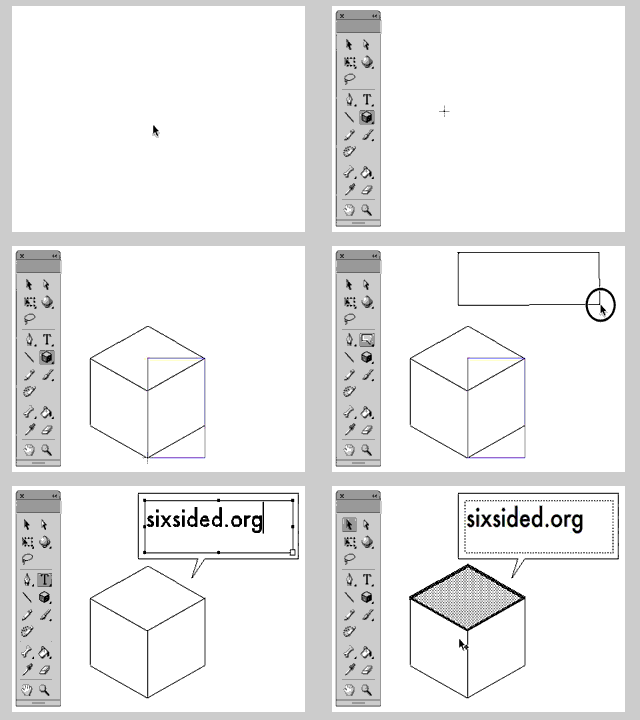
The API I spent the most time scratching my head over was fl.drawingLayer, which is used for rendering the temporary outlines that appear when (for example) you're dragging out a box with the Rectangle tool. It has some quirks.
fl.drawingLayer.beginFrame clears this array.
fl.drawingLayer.endFrame draws the contents of this array to the screen.
fl.drawingLayer.beginDraw , according to its documentation, "puts Flash in drawing mode", and sets the Boolean persistentDraw option, which will cause flash to leave your drawing on the stage after the mouse button is released. In practice it seems to make no difference.
GUESS WHAT PEOPLE. Adobe AIR security sandboxing is gnarly! One case where this bit me was in my attempts to use Google’s YouTube API Player. The player.swf tries to load another remote SWF and is immediately killed by the AIR runtime for causing a “SecuritySandboxViolation”.
What’s going on here?
There are four security sandboxes that ActionScript code can run in:
According to Adobe’s docs,
There are a number of design and implementation patterns common to web applications that are too dangerous to be combined with the local system access inherent in the AIR application sandbox…. runtime script importing of remote content has been disabled in the application sandbox.
Compile-time script importing is allowed — that’s why we’re able load the YouTube API player (henceforth “apiplayer”) by hardcoding its URL into the AIR app. But the apiplayer tries to load a third SWF, which brings down the “no remote content” hammer. The apiplayer isn’t actually in the application sandbox — it can’t access any of the AIR APIs — but let’s play along: we’ll load it into local-with-network sandbox, where there’s no restriction on remote content loading.
Is there an API for this? No.
My workaround:
Apparently when you apply a 3D transformation to a DisplayObject in a Flash / AIR app, it limits the area of the stage to which bitmaps can be drawn — that is, if aDisplayObject contains a bitmap graphic and a vector object, the bitmap will be masked to within the rectangle (0,0, 4096, 4096), while the vector object will be drawn normally no matter where it is. The only fix seems to be not to apply any matrix3D transformation — you can’t touch rotationY, rotationX, rotationZ, perspectiveProjection, or anything that affects the display object’s transform.matrix3D member.
Disconcerting!
Have you ever wanted to control a Flash game with a gamepad? Back when I was working on Space Kitty with Zach , I thought it might be enlightening to do this, but of course Flash isn’t able to access USB devices.
However, Flash does have the Socket class, so if I could read the gamepad’s state from some other network-capable runtime, I’d be able to connect it to Flash remotely. It didn’t take long to discover the PyHID library, a free Python package that provides an interface to USB Human Interface Devices and even auto-detects probable game controllers.
Lacking documentation for my Logitech gamepad, I wrote a script to dump its live state to the terminal, then mashed buttons and watched the output until I’d reverse-engineered its output.
That done, it was trivial to serve the PyHID output to a Flash client. I’ve attached a demo if you want to try it out. Obviously, this isn’t even close to working on a webpage due to Flash’s security sandboxing and the fact that you have to run the python server locally, but it’s fun for prototyping games and could be of use in some kiosk-style application. (That said, I make no warranty as to its utility.)
Grab the demo here:
Remember, you’ll have to adjust Flash’s security sandboxing to allow the SWF to connect to the gamepad server.

This is a script that grabs a timestamped image from your MacBook webcam every 180 seconds:
#!/bin/bash
day=`date "+%Y-%m-%d"`
dest_dir="$HOME/Desktop/look-at-you-hacker/$day"
mkdir $dest_dir
while [ 1 ]
do
    timestamp=`date "+%Y-%m-%d_%H@%M-%S"`
    isightcapture "$dest_dir/$timestamp.jpg"
    sleep 180
done
You’ll need to download isightcapture and drop it in your ~/bin directory.
If you want to convert the resulting directoryful of JPEGs into an animated gif, and you have ImageMagick installed, you can use the following invocation to do it:
convert -geometry 120x -delay 1x4 -loop 0 *.jpg animated.gif
EDIT: If you prefer the Fish shell, here’s the script in that syntax:
#!/opt/local/bin/fish
set day (date "+%Y-%m-%d")
set dest_dir "$HOME/Desktop/look-at-you-hacker-$day"
mkdir $dest_dir
while true
    set timestamp (date "+%Y-%m-%d_%H@%M-%S.jpg")
    isightcapture "$dest_dir/$timestamp"
  sleep 180
end

Another little flash experiment. Mouse X = twist, Mouse Y = stretch. I also have it working with a gamepad and PyHID via a local socket, but that's not really viable on the Web.
It's always interesting how much behavior you can get out of a single shape and a couple of variables.
Just a little Flash experiment...
My friend Scott recently approached me with a proposal: write a script that generates random phrases in the style of Warren Ellis’ Tweets. An interesting project! Ellis typically greets his audience with phrases like:
There’s definitely a family resemblance among the phrases, but they’re not just fill-in-the-blank generica. You can’t generate them by simple string substitution (unlike all those lame Livejournal memes). I decided to analyze the formal grammar of Ellis’ utterances and write an inverse parser. Oh, don’t look at me like that. It’ll be fun!
--MORE--